
Raffle Ticket Template
Running a raffle for a school, club or charity? Fill in the event details and number range, and this template creates numbered raffle tickets with matching stubs — the buyer keeps the ticket, you keep the stub with their name and phone number. Print ten per page with cut lines, and when the time comes, use the random draw to pick winners fairly from the numbers you sold.
Raffle ticket generator
Draw a winner
Raffle Fundraising Pack
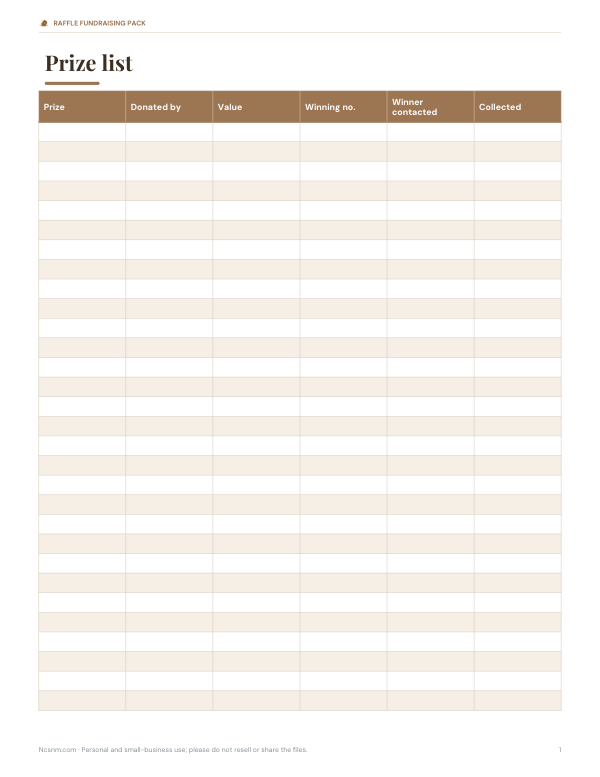
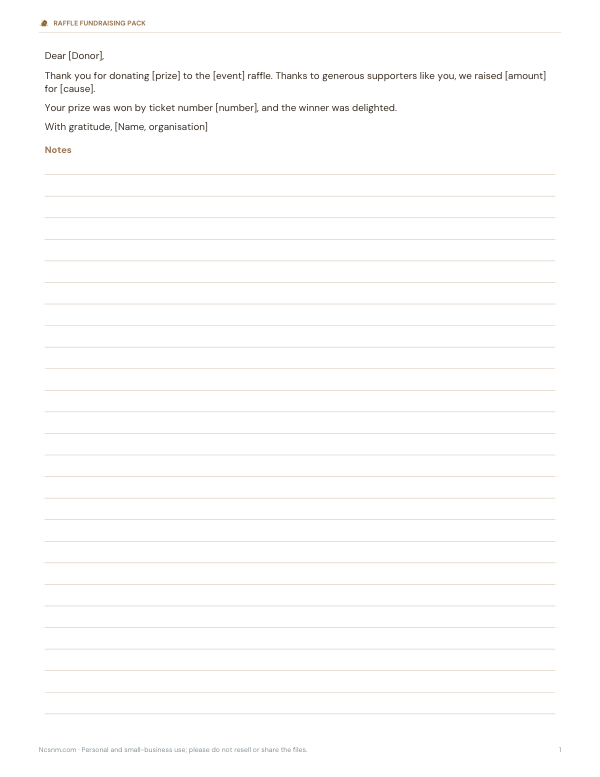
Excel raffle sales tracker by seller and ticket range, a prize list and donor thank-you letter, a winners notice poster and a cash reconciliation sheet.
- Sales tracker (XLSX)
- Prize list (PDF/DOCX/XLSX)
- Thank-you letter (DOCX/PDF)
- Winners poster (PDF)
- Cash sheet (PDF/DOCX/XLSX)
Formats: XLSX, PDF, DOCX. Instant download after payment (link valid 72 hours, up to 5 downloads). AI-assisted: the templates were drafted with AI help and reviewed and laid out by Kedop.
$3.00 USD, one-time
Secure card checkout by Stripe. Full refund within 7 days — see the refund policy and license.
What goes on a raffle ticket
| Part | Details |
|---|---|
| Ticket (buyer keeps) | Event or organisation, ticket number, prize(s), draw date and time, price |
| Stub (you keep) | The same number, buyer’s name, phone and/or email |
| Optional | Licence or registration number if required, organiser contact, “need not be present to win” |
Both halves carry the same number. After the draw you match the winning stub to its buyer and contact them.
How to use the generator
- Enter the event, prizes, draw date and price.
- Set the first and last ticket numbers and choose the number format (001 or 0001).
- Pick a colour for the border and number.
- Click Print tickets — ten tickets print per page with dashed lines between ticket and stub.
- Cut along the outer edges; tear or cut the stubs off when you sell each ticket.
- On draw day, enter the numbers sold and click Draw.
Worked example
For 300 tickets numbered 001–300, the generator prints 30 pages. If you sell tickets 1–64, 70 and 75–80, that is 71 numbers in the draw; drawing two winners gives each sold ticket a 2 in 71 (about 2.8%) chance of winning a prize. The draw uses the browser’s cryptographic random number generator, so every sold number is equally likely.
Running a fair raffle
- Keep all sold stubs together in numerical order.
- Record unsold ticket numbers so they are left out of the draw.
- Draw in public or with witnesses, and note the time.
- If drawing physical stubs, fold them identically and mix well.
- Announce winners and how prizes will be collected.
- Keep records of sales and prizes for your organisation.
Legal note
Raffles are a form of lottery, and the rules vary widely. Many places allow small raffles at events, charities or clubs with conditions — for example, all proceeds going to a good cause, limits on prizes or ticket prices, or a licence or registration for larger raffles. In some places raffles are restricted or need special permission. Check the rules with your local authority or charity regulator before selling tickets.
Printing tips
- Print on card stock (about 65–110 lb cover) so tickets feel sturdy.
- Print a test page on plain paper first.
- Use a paper trimmer for straight edges; perforating the stub line with a rotary perforator makes tearing easier.
- Print only the numbers you plan to sell — you can always print the next range later.
Ideas to sell more tickets
- Show the prizes at the event, or photos online.
- Offer a bundle price (3 for $5).
- Sell from a well-placed table with a clear sign.
- Announce the draw time so people stay.
- Thank sponsors who donated prizes on the tickets and signs.
Pricing raffle tickets
Price tickets so that a typical supporter buys several: a single ticket at a low price plus a bundle (such as 3 for $5 or a strip of 10) encourages bigger sales. Estimate how many you can realistically sell from past events or the size of your audience, and make sure the value of donated prizes justifies the price. Print numbers in blocks — for example 1–100 per seller — so you can track who sold which tickets.
Tracking sales with several sellers
- Give each seller a block of numbered tickets and write the range down.
- Collect unsold tickets and money together at the end.
- Check that stubs sold plus tickets returned equals the block issued.
- Record the money received against each seller.
- Enter all sold numbers in the draw box before drawing.
Privacy
The generator runs in your browser; event details and numbers are not uploaded. Buyer names and phone numbers are written on paper stubs — store them securely and destroy them after the prizes are claimed.
Fundraising pack
The optional pack includes an Excel raffle sales tracker by seller and ticket range, a prize list and donor thank-you letter, a winners notice poster and a cash float and reconciliation sheet. The ticket generator above is free.
AI-assisted content
This page was drafted with AI assistance and reviewed by Kedop. It is not legal advice.
Frequently asked questions
How do I make raffle tickets?
Enter your event, prizes, date, price and number range, then print ten per page and cut them out.
What should a raffle ticket stub include?
The ticket number plus the buyer’s name and phone or email.
How many raffle tickets fit on a page?
Ten with this template.
How do I draw a winner fairly?
Enter the numbers sold and use the random draw, or draw folded stubs from a container in front of witnesses.
Do I need a licence for a raffle?
It depends on where you are and the size of the raffle; check your local rules.
Is my information uploaded?
No, everything runs in your browser.
How many raffle tickets should I print?
Print what you expect to sell plus a small margin; you can print more ranges later.
Can winners be drawn online?
Yes, the draw here is random and fair; many organisers also draw publicly or on a live video for transparency.
What if a winning ticket isn’t claimed?
Set a claim deadline in advance and state what happens — for example, a redraw.
Can I number tickets from 1000?
Yes, set any first and last number; choose four-digit formatting for neat numbers.
What colour card should I print on?
Any light colour works; using a different colour for each seller makes tracking easier.